Skip to content

The Eclectic Quill

Website of Joshua McGee

Mar 8 2017

Post navigation

Older: Helen Keller on Education and Tolerance
Newer: How to transfer and restore your Mac printer settings

How to activate your iPhone’s built-in magnifier

Joshua McGee Blog posts Leave a comment

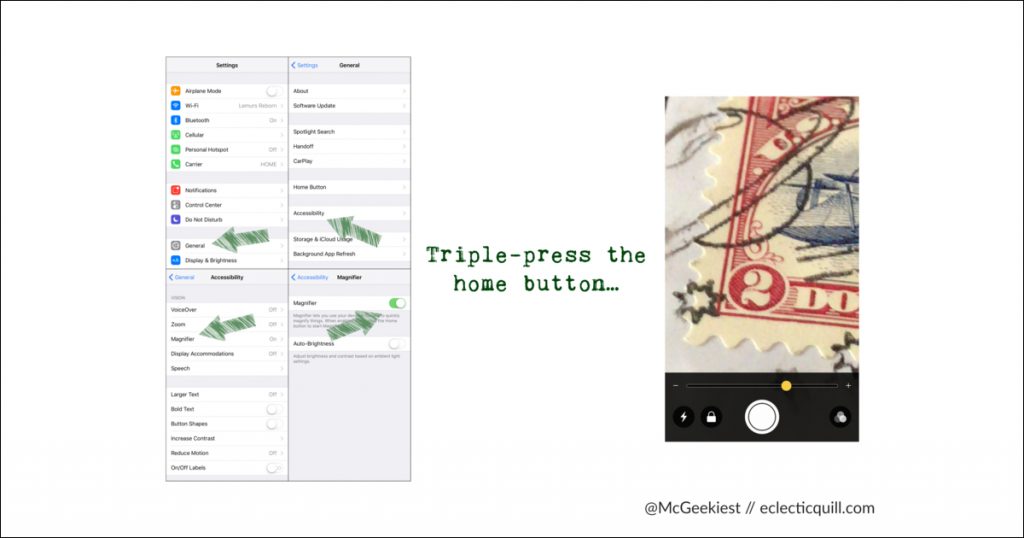
If you own an iPhone, go to Settings » General » Accessibility » Magnifier and turn it on. A quick triple-press of the home button will bring up a powerful and useful magnifier with lighting, zoom, and contrast options.

Filed under: ios, iostips, iphone, iphonetips

Leave a Reply Cancel reply

Your email address will not be published. Required fields are marked *

The Eclectic Quill

Essays, recipes, collections, curiosities, and the occasional rabbit hole.

Search for:

Recent Posts

  • Slow Cooker Beef Bone Broth Recipe
  • Rhubarb-Lime Marmalade with Ginger
  • How to transfer and restore your Mac printer settings
  • How to activate your iPhone’s built-in magnifier
  • Helen Keller on Education and Tolerance
  • Measuring the diameter of a circle in ImageMagick
  • What disqualifies a Priority Mail flat-rate envelope?
  • chime: Have your remote server make a bell sound in your local terminal

Archives

  • March 2018
  • July 2017
  • March 2017
  • February 2017
  • January 2017
  • June 2016
  • January 2016
  • December 2015
  • November 2015
  • October 2015
  • August 2015
  • July 2015

© 2026 The Eclectic Quill